AT 명령어 의미
|
Command
(Sent) |
Response
(Receive) |
보충설명 |
| 1. 통신 테스트 |
AT |
OK |
AT\r\n
OK |
| 2. 리셋 |
AT+RESET |
OK |
AT\r\n
OK |
| 3. 버전 정보 |
AT+VERSION? |
+VERSION
OK |
AT+VERSION?\r\n
+VERSION:2.0-20100601
OK |
| 4. 초기상태로 설정 |
AT+ORGL |
OK |
AT+ORGL\r\n
OK
명령 실행후 아래 사항대로 재 설정 됩니다.
①.Device type: 0
②.Inquire code: 0x009e8b33
③.Module work mode: Slave Mode
④.Connection mode: Connect to the Bluetooth device specified
⑤.Serial parameter: Baud rate: 38400 bits/s; Stop bit: 1 bit; Parity bit: None.
⑥.Passkey: “1234”
⑦.Device name: “H-C-2010-06-01” |
| 5. 어드레스 정보 |
AT+ADDR? |
+ADDR:
OK |
AT+ADDR?\r\n
+ADDR:1234:56:abcdef
OK |
| 6.1 디바이스명 설정 |
AT+NAME= |
OK |
AT+NAME= “EasyFlowBT”\r\n
OK |
| 6.2디바이스명 정보 |
AT+NAME? |
1. +NAME:
OK -- 성공시
2. FAIL----실패시 |
AT+NAME?\r\n
+NAME: EasyFlowBT
OK |
| 7. 원격 블루투스 장치명 정보 |
AT+RNAME? |
1. +NAME:
OK -- 성공시
2. FAIL----실패시 |
원격블루투스 장치 주소가 00:02:72: 0d: 22 : 24;
장치명이 EasyFlowBT 인 경우 예:
AT+RNAME? 0002,72,0d2224\r\n
+RNAME:EasyFlowBT
OK |
| 8.1 모듈 롤 설정 |
AT+ROLE= |
OK |
Param:
0---- Slave role
1---- Master role
2---- Slave-Loop role
Default: 0
Role introduction:
Slave (slave role)----Passive connection;
Slave-Loop----Passive connection, receive the remote Bluetooth master device data and
send it back to the master device;
Master (master role)----Inquire the near SPP Bluetooth slave device, build connection
with it positively, and build up the transparent data transmission between master and
slave device. |
| 8.2 모듈 롤 정보 |
AT+ROLE? |
+ ROLE:
OK |
| 9.1 모듈 타입 설정 |
AT+CLASS= |
OK |
Param: device type
Bluetooth device type is a 32-bit parameter indicates the device type and what type can be supported.
Default: 0
More information is provided at the appendix 1(device type introduction). |
| 9.2 모듈 타입 정보 |
AT+CLASS? |
1. + CLASS:
OK----성공시
2. FAIL----실패시 |
| 10.1 Inquire access code 설정 |
AT+IAC= |
1. OK----성공시
2. FAIL----실패시 |
Param: Inquire access code
Default: 9e8b33
AT+IAC=9e8b3f\r\n
OK
AT+IAC?\r\n
+IAC: 9e8b3f
OK |
| 10.2 Inquire access code 정보 |
AT+IAC? |
+IAC:
OK |
| 11.1 Inquire access mode 설정 |
AT+INQM=,
, |
1. OK----성공시
2. FAIL----실패시 |
Param: Inquire access mode
0----inquiry_mode_standard
1----inquiry_mode_rssi
Param2: the maximum of Bluetooth
devices response
Param3:The maximum of limited
inquiring time
The range of limited time: 1~48
( Corresponding time:1.28s~61.44s)
Default: 1, 1, 48
AT+INQM=1,9,48\r\n --Set Inquire access mode:
1) has RSSI signal intensity indicator,
2) stop inquiring once more than 9 devices response,
3) limited time is 48*l. 28=61.44s.
OK
AT+INQM\r\n
+INQM:1, 9, 48
OK |
| 11.2 Inquire access mode 정보 |
AT+INQM? |
+INQM:,,
aram3>
OK |
| 12.1 비밀번호(passkey) 설정 |
AT+PSWD= |
OK |
Param: passkey
Default: “1234” |
| 12.2 비밀번호(passkey) 정보 |
AT+PSWD? |
+PSWD :
OK |
| 13.1 통신인자(serial parameter) 설정 |
AT+UART=,<
Param2>, |
OK |
Param1: baud rate( bits/s)
The value (Decimal) should be one of the following:
4800
9600
19200
38400
57600
115200
234000
460800
921600
1382400
Param2:stop bit:
0----1 bit
1----2 bits
Param3: parity bit
0----None
1----Odd parity
2----Even parity
Default: 9600, 0, 0
Set baud rate to be 115200, stop bit to be 2 bits, parity bit to be even parity.
AT+UART=115200,1,2,\r\n
OK
AT+UART?
+UART:115200,1,2
OK
|
| 13.2 통신인자(serial parameter) 정보 |
AT+PSWD? |
+UART=,
m2>,
OK |
| 14.1 연결(connection) 모드 설정 |
AT+CMODE= |
OK |
Param:
0----connect the module to the specified Bluetooth address.
(Bluetooth address can be specified by the binding command)
1----connect the module to any address
(The specifying address has no effect for this mode.)
2----Slave-Loop
Default connection mode: 0 |
| 14.2 연결(connection) 모드 정보 |
AT+CMODE? |
+ CMODE:
OK |
| 15.1 bind Bluetooth address 설정 |
AT+BIND= |
OK |
Param----Bluetooth address needed to be bind
Default address:
00:00:00:00:00:00
The module is at connection mode which connects to specified Bluetooth address,
and the specified address is 12:34:56:ab:cd:ef.
Command and the response show as follow:
AT+BIND=1234, 56, abcdef\r\n
OK
AT+BIND?\r\n
+BIND:1234:56:abcdef
OK |
| 15.2 bind Bluetooth address 정보 |
AT+BIND? |
+ CMODE:
OK |
| 16.1 drive indication of LED and connection status 설정 |
AT+POLAR=,
|
OK |
Param1:The value is
0----PI08 outputs low level and turn on LED
1----PI08 outputs high level and turn on LED
Param2:The value is
0----PI09 output low level, indicate successful connection
1----PI09 output high level, and indicate successful connection
Default: 1, 1
PI08 outputs low level and turn on LED,
PI09 outputs high level and indicates successful connection.
Command and response show as follow:
AT+POLAR=0, 1\r\n
OK
AT+POLAR?\r\n
+POLAR=0, 1
OK |
| 16.2 drive indication of LED and connection status 정보 |
AT+POLAR? |
+POLAR=,
OK |
| 17 PIO single port output 설정 |
AT+PIO=, |
OK |
AT+PIO=Param1: PIO port number(Decimal)
Param2: PIO port status
0----low level
1----high level,
HC-05 Bluetooth module provides the user with the ports (PI00~PI07 and PI010)
which can extern another input and output ports.
Example:
1. PI010 port outputs high level
AT+PI0=10, 1\r\n
OK
2. PI010 port outpust low level
AT+PI0=10, 0\r\n
OK |
| 18 PIO multiple port output 설정 |
AT+MPIO= |
OK |
Param: Mask combination of PIO ports number (Decimal) |
| 19 Inquire PIO port input |
AT+MPIO? |
OK |
InquParam----PIO port value (16bits)
Param[0]=PI00
Param[1]=PI01
Param[2]=PI02
……
Param[10]=PI010
Param[11]=PI011ire PIO port input
HC-05 Bluetooth module provides the user with the ports (PI00~PI07 and PI010) which can extern another input and output ports. |
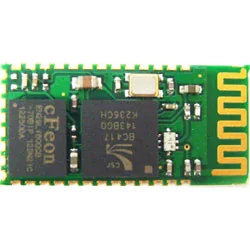
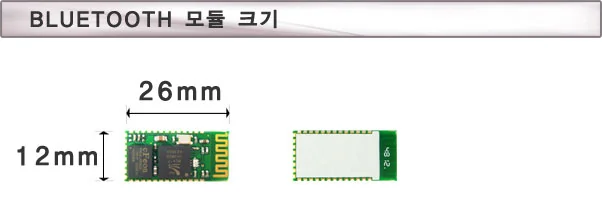
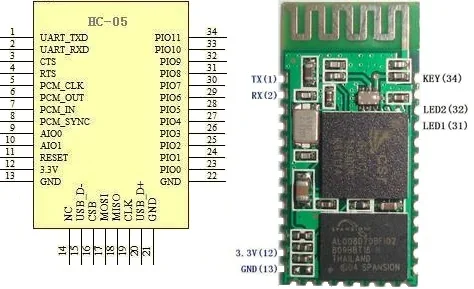
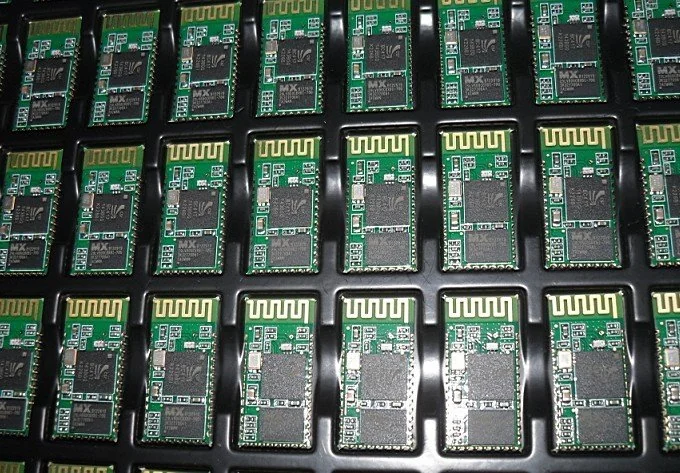
 HC-05 마스터 슬레이브 겸용 블루투스 모듈의 AT Command 다운로드